

|
|
|
|
|
||||||||
|
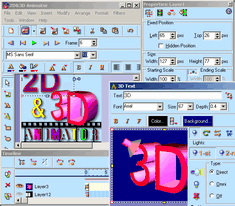
2D&3D Animator produces high-quality images, titles, banner ads and buttons for your Web page or for a presentation.
The ready-made templates make the product easier to use. You can choose one of several ready-made templates for banners , buttons or logos. Once you select a template, you can begin to alter it any way you want. By double clicking on objects you bring up tool bars and options. To cut loading time for your visitors, have the program optimize your graphic by removing extraneous material. Once finished, output may be exported as GIF or AVI clips as well as JPEG, ICO, PNG or Bitmap images. Key Features: • Creates 3D text . • Creates 2D text . • Live Animation . • Image Optimization . • Vector Images, Polygons, Lines . • Built in Image effects: drop shadow, glow, inner shadow, blurred bevel and inner glow . • Unlimited transparency capabilities . • Filling objects: linear fill, velvet fill, radial fill, conical fill, square fill and pattern . • FTP Upload directly to any folder on your Website. • Works with most popular image formats. • Spell Checking for major languages . Ways to Use: • Creating banners, buttons or logos for Web page • Creating AVI clips for presentation. • Creating icons for applications. • Convert existing graphics files to another format. System Requirements: • Intel® Pentium® II/200 MHz or compatible • Microsoft® Windows® 95, 98, ME, NT, 2000, or XP • 32MB RAM (64 MB recommended) • 20 MB hard disk space • Color monitor • Mouse or other pointing device
|
|
Copyright ?2002-2004 Ussun. All rights
reserved.
Protected by the copyright
laws of the United States and by international
treaties.